
 |
|||
©2003
Mp3Doctor All rights reserved. |
MP3Doctor - Mp3 Trim
MP3 TRIM - This Mp3 Trim feature let you delete the leading and end silence of a song.
There are TWO different Mp3 TRIM METHODS for Mp3Doctor:
You can adjust the next settings in the OPTION window in the Mp3 TRIM tab:
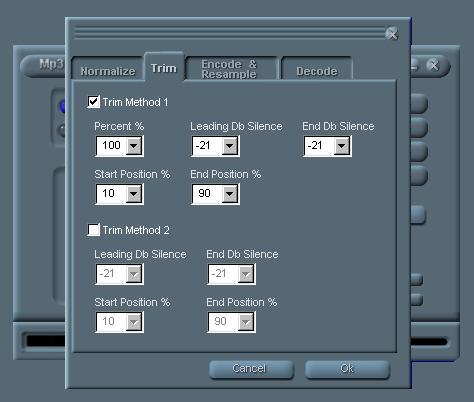
Percent - Is the percent of
Leading Db silence- Is the level on wich a sound will be considered silence
at the start of the song.
End Db Silence- The same level to be considered silence at the end of
the song.
In some cases this values could be modified if at the start or end of
a song there are some 'silence' to be deleted but its not really a digital
absolute silence (has some hiss, etc). If you change it, remember to set
it again to -21 when you trim other files or the result could be erroneus
Start position and end position means the limit on wich Mp3Doctor will
scann looking for silence, recommended are 10% and 90%.
Mp3Doctor trim
| FEATURES { Normalize
| Mp3 Trim | Resample |
Mp3 Equalize | Mp3 Encoder
Mp3 Decode | Single Mode | Batch
Mode | Mp3 Karaoke | Mp3 Tempo
| Mp3 Pitch }
ORDER | DOWNLOAD
| CONTACT
support@mp3software.com.ar
©2003 Mp3Doctor. All rights
reserved.